


7.2[Intermediate]SQL 基础 ( 二 )

此文章是 #Footprint Analytics for SQL 系列 的其中一个章节。
前言: 在”SQL 基础(一)“部分中我们介绍了 SQL 的基础知识,包括 SQL 查询语句的基础结构语法说明、日期时间、分组聚合、子查询、关联查询和联合查询等内容,接下来我们继续介绍一些常用的 SQL 基础知识点
常用的日期函数和时间间隔使用
链上的数据都是按照交易发生的时间先后顺序进行记录保存的,日常分析中经常需要对一段时间范围内的数据进行统计。上个部分介绍过 date_trunc 函数的用法,主要是对日期进行截断处理。除此之外还有一些常用的函数和使用方法
now() 和 current_date 函数
函数 now() 用于获取当前系统的时间,精确到微秒。需要注意的是 FootPrint Analytics 的 token_price_5min 是五分钟间隔的,要将其他表和价格表用时间字段做关联时,必须先按五分钟截取,否则可能关联不上正确的代币价格
函数 current_date 用于获取当前时间,以天为单位。当我们需要按时间日期筛选筛选数据时通常需要结合他们来使用,函数 current_date 相当于 date_trunc(‘day’,now())
- SQL
*select*
now() – 当前系统日期和时间
,current_date –当前系统日期
,current_timestamp –与 now 相同
,date_trunc(‘day’,now()) – 与 current_date 相同
,from_unixtime(cast(to_unixtime(now())/300 AS BIGINT) * 300) – 将当前时间指定为一天中每 5 分钟除以的数值
- Footprint Query URL
https://www.footprint.network/chart/Date-Functions-fp-35130
date_add 和 date_diff 函数
函数 date_add(unit,value,expr) 在一个日期表达式上面添加一个日期单位加上 value 的值。’unit’ 常用的单位有:hour,day,week,month 等。value 表示从后面的表达式减去对应时间单位数值,当然 value 也可以是负数
函数 date_diff(unit,start_date,end_date) 得到两个日期表达式直接间隔的数值,unit 常用的单位有:day,week,month。如果 end_date > start_date ,放回正数,否则则是负数
- SQL
*select*
*date_add(‘day’,-90,now()) “past 90D” –*
,date_add(‘day’, 365,date’2021-01-01’) as add_365_day
,date_add(‘day’, -365,date’2022-01-01’) as sub_365_day
,date_diff(‘day’,date ‘2021-01-01’,date ‘2022-01-01’) as “end_date>start_date”
,date_diff(‘day’,date ‘2022-01-01’,date ‘2021-01-01’) as “end_date
Interval 类型
interval 是一种数据类型,以指定的日期时间单位表示某个时间间隔。
SQL
*select*
now() - interval ‘2’ hour – 两个小时前
,current_date - interval ‘7’ day – 七天之前
,now() + interval ‘1’ month – 一个月之后的当前时间
更多日期时间相关函数的说明,请参考
条件表达式 case、if、coalesce
case
- 当我们需要应用条件逻辑的时候,可以应用 case 语句。CASE 语句的常用语法格式为 CASE {WHEN cond1 THEN res1} […] [ELSE def] END,它可以用多个不同的条件评估一个表达式,并返回第一个评估结果为真值(True)的条件后面的值,如果全部条件都不满足,则返回 else 后面的值。其中的 else 部分还可以省略,此时返回 NULL
如果我想要查看 OpenSea marketplace 在最近 7 天每笔交易额换算为 ETH 的金额进行分三个档次,分别是小于 10ETH,在 10 到 50 之间和大于 50
*select*
date_trunc(‘day’,block_timestamp) as block_date, – 把 block_timestamp 时间转换成天
*eth_amount_range,*
count(transaction_hash) as transactions – 计算每天,每个分的交易次数
*from*
(
*select*
transaction_hash,
amount,
block_timestamp,
collection_slug,
case when eth_amount < 10 then ‘<10 eth’ – 当 eth_amount <10 就归入 ‘<10 eth’的分组
when eth_amount >= 10 and eth_amount <= 50 then ‘between 10 to 50 eth’ – 当 eth_amount >= 10 并且 <=50 就归入’between 10 to 50 eth’ 分组
else ‘>50 eth’ – 否则就归入 ‘> 50 eth’ 的分组
*end as eth_amount_range*
from nft_transactions
*where*
marketplace_slug =‘opensea’ – 筛选 marketplace 是 opensea 的交易
and eth_amount is not null – 筛选 eth_amount 不为空的数据
and block_timestamp >= (current_date - interval ‘7’ day) – 筛选前七天的数据
)as range_info – 把括号里的查询当成一个视图,将视图命名为 range_info
group by 1,2 – 按第一个和第二个字段进行分组
order by 1 – 按第一个字段,即 block_date 做升序排序
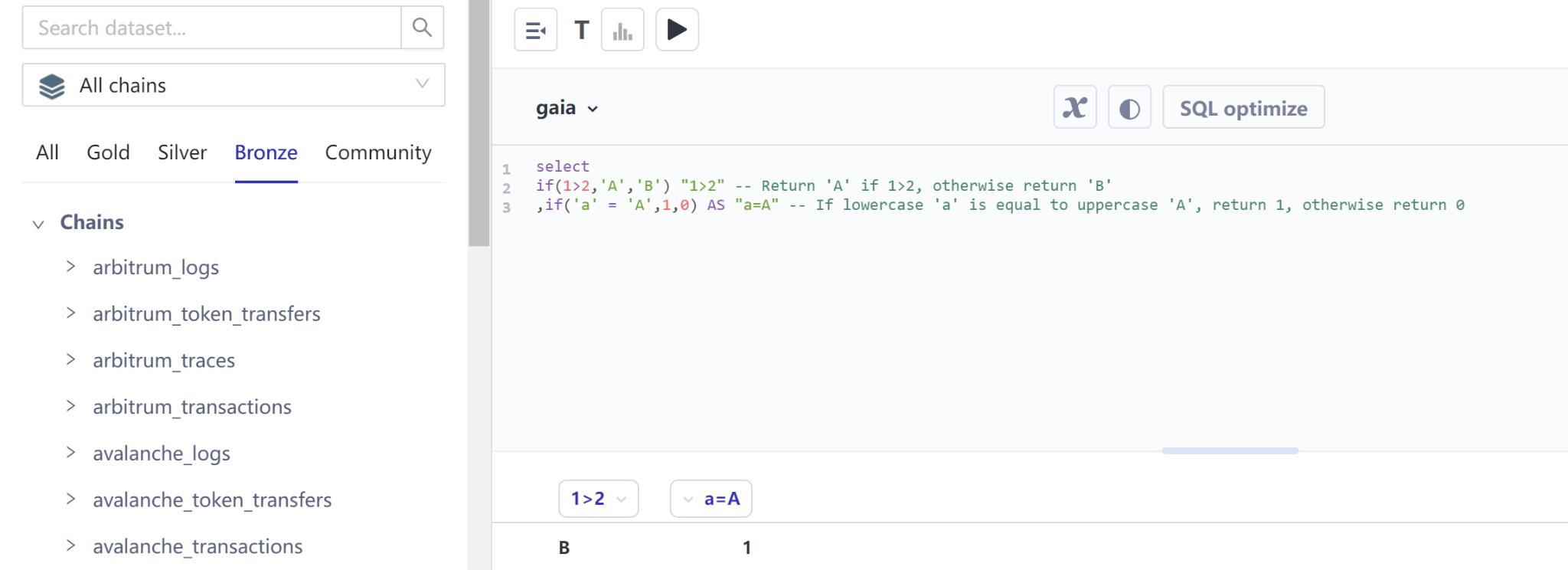
函数 if(cond, expr1, expr2) 它的作用时根据条件值评估的真假,返回两个表达式中的其中一个值。如果条件评估结果为真值,则返回第一个表达式,如果评估为假值,则返回第二个表达式。
SQL
*select*
if(1>2,‘A’,‘B’) “1>2” – Return ‘A’ if 1>2, otherwise return ‘B’
,if(‘a’ = ‘A’,1,0) AS “a=A” – If lowercase ‘a’ is equal to uppercase ‘A’, return 1, otherwise return 0
函数 COALESCE(val1, val2, …., val_n),return the first non-null value in a list
SQL
*select*
COALESCE(NULL, ‘Footprint Analytics’,‘A’) – return Footprint Analytics
,COALESCE(NULL,‘A’,‘Footprint Analytics’) – return A
,COALESCE(‘A’,NULL,‘Footprint Analytics’) – return A
处理字符串常用函数
字符串转小写
字符串位数截取
字符串连接
16 进制转 10 进制
Lower()
在 Footprint Analytics 中 EVM 兼容链的交易哈希值(hash)、用户地址、智能合约地址这些全部以小写字符格式保存。但是在字符串比较的时候,是区分大小写的。字符 a 和 A 是不同的,地址 *0x3ddfa8ec3052539b6c9549f12cea2c295cff5296* 和 *0x3DdfA8eC3052539b6C9549F12cEA2C295cfF5296* 是“不相等”的。所以我们需要将地址手动转换为全部小写再比较,或者使用 lower() 函数转换后比较。
SQL
*select*
‘a’=‘A’ – Character case is different, return false
,‘a’=‘a’ – Character case is the same, return true
,‘0x3ddfa8ec3052539b6c9549f12cea2c295cff5296’ = ‘0x3DdfA8eC3052539b6C9549F12cEA2C295cfF5296’ –Character case is different, return false
,‘0x3ddfa8ec3052539b6c9549f12cea2c295cff5296’ = LOWER(‘0x3DdfA8eC3052539b6C9549F12cEA2C295cfF5296’) –Character case is the same, return true
Substring() 函数
substring(string, start)
Returns the rest of string from the starting position start. Positions start with 1. A negative starting position is interpreted as being relative to the end of the string.
substring(string, start, length)
Returns a substring from string of length length from the starting position start. Positions start with 1. A negative starting position is interpreted as being relative to the end of the string.
Concat() 函数和 || 操作符
- 函数 concat(expr1, expr2 [, …] ) 将多个表达式串接到一起,常用来链接字符串。操作符||的功能和 Concat 函数相同
from_base
- Returns the value of string interpreted as a base-radix number.
下面是一个使用上述函数的综合例子,这个例子从 ethereum_logs 表解析跨链到 ronin 链的 的记录
- SQL
“
select date_trunc(‘day’, block_timestamp) as block_date, –截取日期
substring(data, 3 + 64 * 3, 64) hex_address, – 提取 data 中的第 4 部分转换为用户地址,从第 3 个字符开始,每 64 位为一组
concat(‘0x’, substring(substring(data, 3 + 64 * 3, 64), -40)) as address, – 提取 data 中的第 4 部分转换为用户地址,从第 3 个字符开始,每 64 位为一组,从右截取 40 位,用’0x’连接截取出来的数据
concat(‘0x’, substring(substring(data, 3 + 64 * 4, 64), -40)) as token, – 提取 data 中的第 5 部分转换为用户地址
substring(data, 3 + 64 * 11, 64) as hex_amount, – 提取 data 中的第 12 部分
from_base(substring(data, 3 + 64 * 11, 64),16) as amount, – 提取 data 中的第 12 部分,转换为 10 进制数值
transaction_hash
from ethereum_logs
*where address = ‘0x64192819ac13ef72bf6b5ae239ac672b43a9af08’ – Axie Infinity: Ronin Bridge V2*
and element_at(topics,1) = lower(‘0xd7b25068d9dc8d00765254cfb7f5070f98d263c8d68931d937c7362fa738048b’) – Send
and substring(data, 3 + 64 * 4, 64) = ‘000000000000000000000000c02aaa39b223fe8d0a0e5c4f27ead9083c756cc2’ – WETH,直接判断 16 进制值
and block_timestamp >= now() - interval ‘7’ day
limit 10
”
- Footprint Query URL
https://www.footprint.network/chart/ethereum-logs-Parse-Axie-Infinity%3A-Ronin-Bridge-V2-fp-35308
窗口函数
多行数据的组合成为窗口(Window)。对窗口中的一组行进行操作并根据该组行计算每一行的返回值的函数叫窗口函数。窗口函数对于处理任务很有用,例如计算移动平均值、计算累积统计量或在给定当前行的相对位置的情况下访问行的值
function 可以是排名窗口函数、分析窗口函数或者聚合函数。over 是固定必须使用的关键字。window_spec 部分又有两种可能的变化:partition by partition_feild order by order_field 或者 order by order_field,分别表示先分区再排序和不分区直接排序。除了把所有行当作同一个分组的情况外,分组函数必须配合 order by 来使用。
- 累加
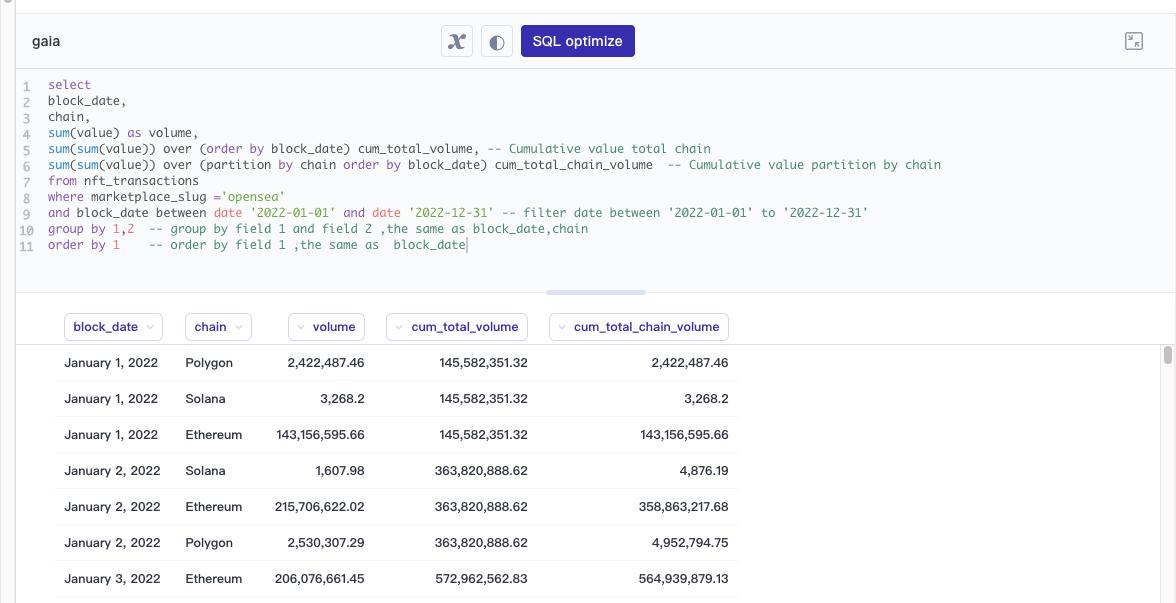
我需要计算 2022 年 OpenSea 的每天累计交易量,和按每条链每天累计的交易量
- SQL
*select*
block_date,
chain,
sum(value) as volume,
*sum(sum(value)) over (order by block_date) cum_total_volume, – Cumulative value total chain*
sum(sum(value)) over (partition by chain order by block_date) cum_total_chain_volume – Cumulative value partition by chain
from nft_transactions
where marketplace_slug =‘opensea’
and block_date between date ‘2022-01-01’ and date ‘2022-12-31’ – filter date between ‘2022-01-01’ to ‘2022-12-31’
*group by 1,2 – group by field 1 and field 2 ,the same as block_date,chain*
order by 1 – order by field 1 ,the same as block_date
- Footprint Query URL
lead() 和 lag() 函数
The LEAD() function is useful for comparing the value of the current row with the value of the subsequent rows.
- Syntax :LEAD(return_value ,offset [,default]) OVER ( [PARTITION BY partition_expression, … ] ORDER BY sort_expression [ASC | DESC] )
The LAG() function is useful for comparing the value of the current row with the value of the previous rows.
- Syntax:LEAD(return_value ,offset [,default]) OVER ( [PARTITION BY partition_expression, … ] ORDER BY sort_expression [ASC | DESC] )
我需要看 OpenSea 最近 90 天每天的交易量和相教于上一天的交易额变化情况
- SQL
*select*
block_date,
volume,
lag(volume) over(order by block_date) as lag_1D_volume, – Previous day’s volume
volume -lag(volume) over(order by block_date) as lag_1D_volume_growth – The current day’s volume - the previous day’s volume
*from*
(
*select*
block_date,
sum(value) as volume
from nft_transactions
where marketplace_slug =‘opensea’
and block_date >= date_add(‘day’,-90,current_date) – Filtering the last 90 days of data
group by 1
*order by 1*
)as v
- Footprint Query URL
https://www.footprint.network/chart/OpenSea-daily-volume-change-in-the-last-90-days-fp-35312
Row_Number()
- Returns a unique, sequential number for each row, starting with one, according to the ordering of rows within the window partition.
我需要按照每条链的 NFT 的市值进行排序
- SQL
select
*row_number() over (order by market_cap desc) as ranking –Sorted by market cap in descending order*
,logo
,ncds.collection_name
,ncds.chain
,row_number() over (partition by ncds.chain order by market_cap desc) as chain_ranking – Grouped by chain and then sorted by market cap in descending order
,market_cap
,volume
*from*
*nft_collection_daily_stats as ncds*
*left join*
*nft_collection_info as nci*
on ncds.collection_contract_address = nci.contract_address and ncds.chain = nci.chain
where on_date = (select max(on_date) from nft_collection_daily_stats)
order by 1 asc
- Footprint Query URL
https://www.footprint.network/chart/The-latest-Data-of-NFT-MarketCap-Ranking-fp-35313
** **
日常使用的处理数组的函数
array_agg()
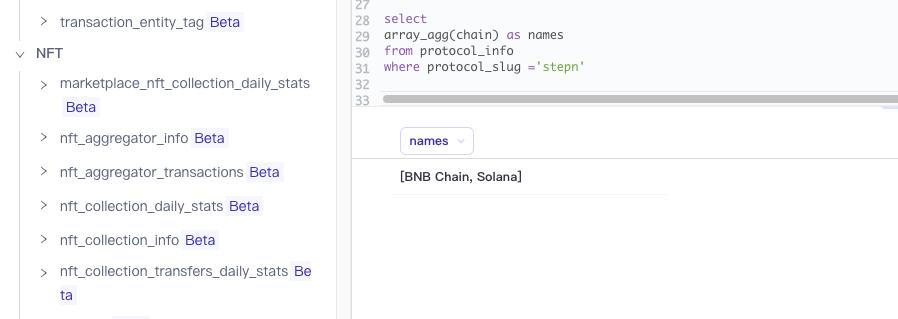
Merge one column of each row of data in the query result set together
List the chains on which the stepn protocol is published
- SQL
select array_agg(chain) as names
from protocol_info
where protocol_slug =‘stepn’
element_at(array(E), index)
- Returns element of array at given index. If index > 0, this function provides the same functionality as the SQL-standard subscript operator ([]), except that the function returns NULL when accessing an index larger than array length, whereas the subscript operator would fail in such a case. If index < 0, element_at accesses elements from the last to the first.
unnest()
SELECT * FROM UNNEST(ARRAY[1,2]) AS t(number);
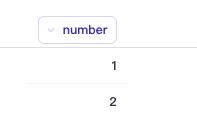
- Maps are expanded into two columns (key, value):
SELECT * FROM UNNEST(
map_from_entries(
ARRAY[
(‘SQL’,1974),
(‘Java’, 1995)
])
) AS t(language, first_appeared_year)
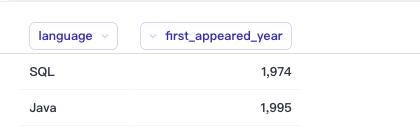
more unnest function link
sequence(start, stop, step)
- Generate a sequence of dates from start to stop, incrementing by step. The type of step can be either INTERVAL DAY TO SECOND or INTERVAL YEAR TO MONTH.
I need consecutive dates per day between 2022-01-01 and 2022-01-05
- SQL
*select cast(date_column as date) date_column from*
(
VALUES (sequence(date(‘2022-01-01’),date(‘2022-01-05’),INTERVAL ‘1’ day))
)as t1(date_array)
CROSS join UNNEST(date_array) as t2(date_column)
总结
每一种数据库都有几十个甚至上百个内置的函数,上面只是介绍了一小部分的常用函数。更多的内置函数用法:Trino 内置函数
推荐阅读
[#Footprint Analytics for SQL]()
Footprint Analytics 是首家 Crypto 领域支持无代码数据分析平台。平台还提供一个统一的数据 API,让用户可以快速检索超过 23 条公链生态的 NFT,GameFi 以及 DeFi 数据。
如果您对该课程有任何反馈或建议,您可以通过以下方式联系我们。
Footprint Website: https://www.footprint.network
Discord: https://discord.gg/3HYaR6USM7
Twitter: https://twitter.com/Footprint_Data
【免责声明】市场有风险,投资需谨慎。本文不构成投资建议,用户应考虑本文中的任何意见、观点或结论是否符合其特定状况。据此投资,责任自负。
来源链接